Friday, June 17, 2011

Thursday, June 16, 2011

My Blackberry Wallpapers

Here are some of my Blackberry Wallpaper collections.... Feel free to use!


Monday, June 13, 2011

5 easy Steps to Transfer Music from your iPod to a Computer


1. In Windows Explorer, go to Tools > Folder Options > View. In the Advanced Settings list, under Hidden files and folders, check the radio button for “Show hidden files and folders”. Then click OK. You’ll get a Windows security warning but it’s safe enough to disregard it as we will only be disabling this function for a short while.
2. Plug in your iPod. In Windows Explorer, a folder will now appear with the name of your iPod.

Double-click on that. Go to the sub-folders “iPod_Control” and then “music”. You’ll find your music there randomly scattered across multiple folders and with scrambled file names. But don’t worry, the ID3 tags are still fully intact and we are now going to “unscramble” the files.
3. But first copy all the music from those iPod folders into a new folder on your hard-drive. Move all the songs into one single folder and discard all the folders that your iPod made. By the end, you should have one folder in your hard-drive with all the scrambled files together.
4. Open up iTunes and do the following : Go to Edit > Preferences. Under the Advanced tab, under the General “sub-tab”, select the local folder where you have copied the music from your iPod (by clicking Change…).
Check the box “Keep iTunes Music folder organized” and click OK. Also make sure you have wiped all previous music from iTunes so your playlists are blank.
5. In iTunes, click “File” then “add folder to library”. Select the folder where all your copied music is. iTunes will now re-import all your music back into the playlists. But more importantly, because you have previously clicked “Keep iTunes Music Folder organised”, iTunes will now start renaming and organising your songs into their correct names, albums and folders. This may take a while depending on how many songs you have in your iTunes library.
There you have it. Oh and don’t forget to go back into Windows Explorer, and to Tools > Folder Options > View. Reverse what you did so the hidden files remain hidden again. You may also want to de-select “Keep iTunes Music Folder organised” if you don’t normally use that option.

You may want to also take this opportunity (before doing the above) to wipe your iPod and revert it back to the factory settings. I would suggest defragging your iPod (although I think that is potentially rife with problems). Then afterwards, just use iTunes to move your music from your PC back to your iPod.
Reverting it back to factory settings is good for getting rid of any crap that has built up inside the iPod and making it run faster. After all, the iPod is basically a hard-drive and like PC hard-drives, an iPod can do with a purge once in a while to give it its speed back.

Another Dr. Dre Beats

I've never really got to enjoy listening to music until I got my first Dr. Dre Beats earphones. It's amazing when you get to hear every sound in detail! Though at first I was a little uncomfortable with the in-ear earphones, I eventually got used to it. 

About three weeks ago, I accidentally reset my iPod and lost about 70 gigs of music and video files which I painstakingly collected over the years. What really hurt there was the loss of movie files that I had to convert from DVD format to mp4 and there were about 30 of them :(

Good thing my brother Pat had most of the music files I had so I was able to get most of them back...except of course for the movie files! I'll just have to do this all over again one-by-one!

I have just recently gifted myself with another Dr. Dre Beats Headphones. They were offering a 49% discount on their website and couldn't pass off on this http://www.beatsbydrdre-outlet.com

Monster Beats Solo HD High Definition
 Special Edition-Red

From $289 to $146 for the Monster Beats Solo HD High Definition
 Special Edition-Red. In pesos, we are talking about Php12,500 down to Php6,300. With taxes, I got it for just a little under 7K. And it was worth every peso!

The sound quality is just amazing! 


Monday, May 2, 2011

VJ Gregg

Family Day

First stop: Meycauayan, Bulacan STAC export overrun factory outlet. They serve free lunch and have snacks for their patrons. Chicken adobo with boiled egg and a piece of shanghai lumpia prepared in styropacks with unlimited bottled soft drinks! Way to go STAC!


Next stop: Aqua Green Resort, Capas, Tarlac c/o our gracious host Ms. Edna Ong who brought us a bilao of the most delicious pancit luglug we've ever tasted (sorry, forgot to take a pic of it). They had 3 pools which were full of kids and adults that were cooling down in the sweltering summer heat! None of us wanted to take a dip even though we wanted to, for fear of what kids usually do when their in the pool!!! I guess that' why they're called PEE-POOL! Hehe :D


So we all decided to move on to our next stop, Clark. We all went gaga over all the chocolates and chips we could get our hands on! After filling our carts and paying at the counter, we headed off to check out some of the venues here for future getaways from the hustle and bustle of Manila life. Fontana and Clearwater are definitely on our list of must-do's before summer ends!


I will try and upload pics of their facilities and activities that they offer for your viewing pleasure at the soonest.


For now, it's back to Manila. Booooo!
Sent from my BlackBerry® wireless handheld

Monday, April 18, 2011

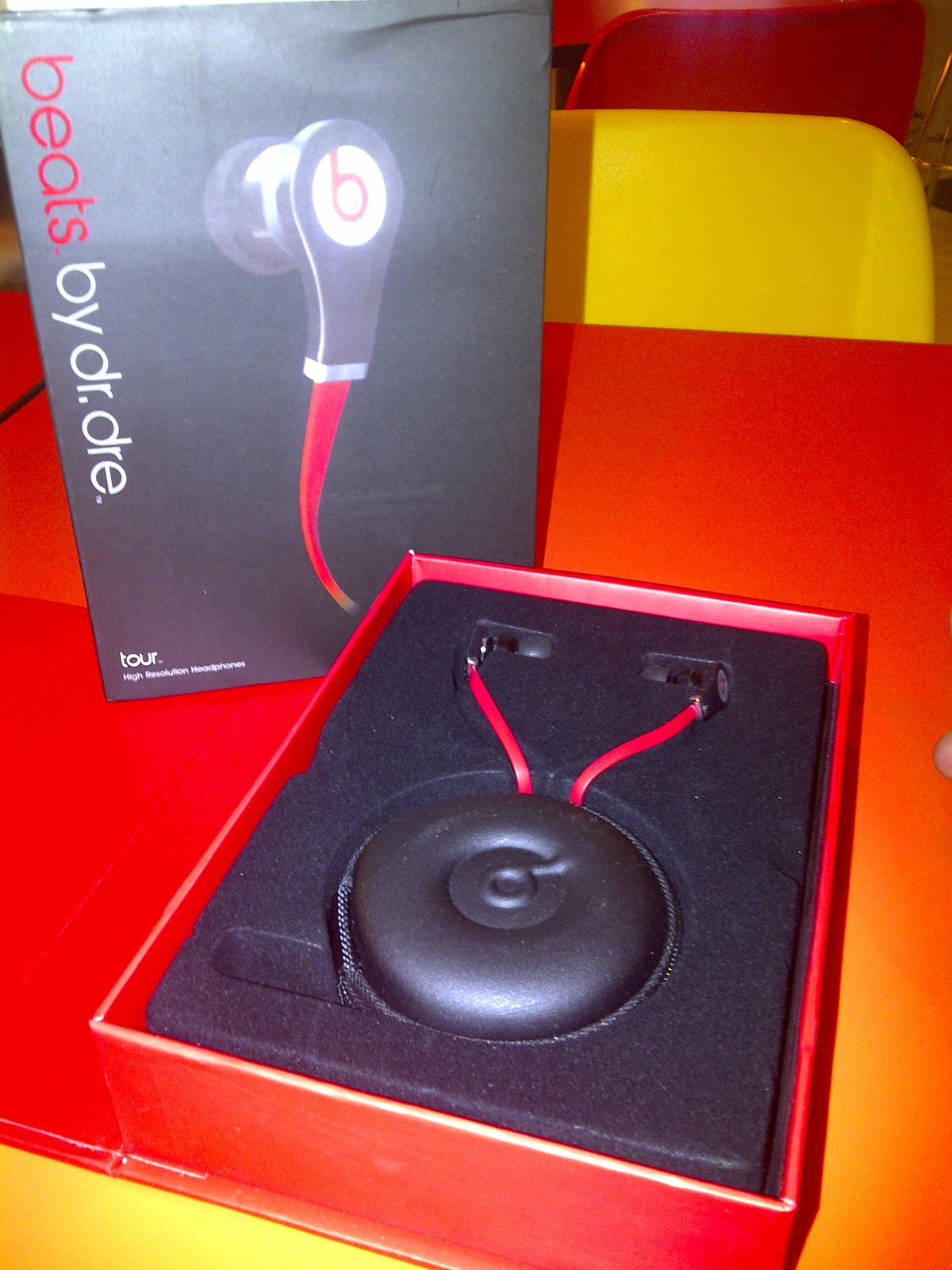
Dr. Dre Beats


Boo Yah
Got myself a Dr. Dre Beats in-ear headset that cost me an arm! An office mate of mine commented on twitter that the box was so big for such a small item. Thinking about it now, I guess I paid more for the box than I did the earphones! Check it out and see what I mean!


Monday, April 11, 2011

Welcome

Hello World!


Welcome to my personal blog! I will attempt to share my thoughts and ideas about a host of topics that have one way or another stirred my emotions. It may be biased, but let's see how objective I can be. I will give you the opportunity to... React. :D